
🔍 Read the full analysis: What Are The 10 Best AI Mini PCs For Local AI Workloads In 2026? on ThorstenMeyerAI.com

Get business pricing on tech for your team
- Business-only prices and quantity discounts
- Tax-exempt purchasing
- Multiple users, one account, clear invoices
TL;DR
A 2026 comparison of AI mini PCs picks the GEEKOM A9 Max (Ryzen AI 9 HX 470, 32GB DDR5, 2TB SSD) as the best overall machine for local AI workloads. The GMKtec EVO-X3 stands out with 128GB of LPDDR5X for memory-heavy tasks, while the GMKtec K15 with Oculink targets buyers planning external graphics expansion.
A new 2026 comparison of AI mini PCs names the GEEKOM A9 Max as the best overall pick for local AI workloads, citing its Ryzen AI 9 HX 470 processor paired with 32GB of DDR5 memory and a 2TB SSD as the most balanced ready-to-use configuration among ten evaluated options. The roundup, based on ThorstenMeyerAI’s listed specifications, positions the GMKtec EVO-X3 as the memory leader with 128GB of LPDDR5X, and the GMKtec K15 with Oculink as the choice for buyers planning external graphics expansion. The comparison matters because local AI work is increasingly constrained by memory capacity and expansion options rather than processor branding alone.
1. GEEKOM A9 Max — Best Overall
The A9 Max earns the top spot for combining a Ryzen AI 9 HX 470 with 32GB of DDR5 and a 2TB SSD out of the box. According to the roundup, it offers the most balanced listed package among the ten configurations, avoiding the immediate upgrades smaller setups may require.
2. GMKtec EVO-X3 — Memory Leader
The EVO-X3 stands apart with 128GB of LPDDR5X, four times the memory of most entries. The roundup assigns it a specialist role for workloads that need large models or datasets in memory, rather than ranking it as a general-purpose leader.
3. GMKtec K15 with Oculink — Expansion Pick
This configuration pairs an Intel Core Ultra 5 125U with a 512GB SSD and an Oculink connection for external graphics enclosures. The roundup frames it as a tradeoff: buyers gain a path to more graphics capacity but give up half the included storage of its sibling model.
4. GMKtec NucBox K15 — Storage-Forward Variant
The NucBox K15 uses the same Core Ultra 5 125U but lists a 1TB SSD and omits Oculink. The two K15 configurations illustrate how otherwise similar machines make different compromises between storage and expandability.
5. GEEKOM GT15 Max
The GT15 Max is listed with a premium processor option and 32GB of RAM. The roundup advises buyers to match that capacity to their actual workload rather than assuming the highest-tier processor is always the best fit.
6. GEEKOM IT15
Like the GT15 Max, the IT15 arrives in a listed configuration with 32GB of memory and a premium processor tier, placing it in the middle band of the comparison for demanding local AI use.
7. MINISFORUM AI X1 Pro
The AI X1 Pro rounds out the premium 32GB tier. The roundup treats all three of these machines as capable starting points whose real-world AI performance depends on software support and cooling, not processor labels.
8. Additional 32GB Configurations in the Lineup
The comparison notes that several further listed configurations arrive with 32GB of RAM across different processor tiers. These fill the middle and lower ranks of the ten-pick field, suited to lighter or more constrained AI tasks.
9. Smaller-Storage Budget Entries
Entries listing 500GB or 512GB drives rank lower for demanding local AI use in the comparison, since local models and datasets consume storage quickly and smaller boot drives can force early upgrades or external-storage clutter.
10. Specialist and Lower-Tier Picks
The remaining slots go to configurations the roundup describes as less powerful or less fully equipped for demanding local AI work, included to cover distinct needs such as compact size, lower cost, or specific connectivity rather than raw capability.
Across all ten picks, the central tradeoff the comparison identifies is between a powerful integrated system and a smaller, more flexible setup that may need upgrades — particularly memory and storage — for demanding AI tasks.
The 10 picks
- 1
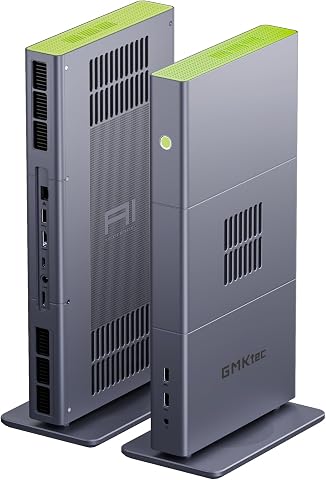 GMKtec EVO-X3 Mini PC with AMD Ryzen AI Max+ 395, 128GB LPDDR5X, and 2TB PCIe…View on Amazon →
 - 2
 GMKtec EVO-X2 AI Mini PC AMD Ryzen AI Max+ 395, Up to 5.1GHz, 16C/32TView on Amazon →
 - 3
 GEEKOM A9 Max Top AI Mini PC, AMD Ryzen AI9 HX470, 32GB DDR5, 2TB SSDView on Amazon →
 - 4
 GEEKOM IT15 Mini PC with Intel Ultra 9 285H, 32GB DDR5, 1TB SSD, Arc 140T GPU…View on Amazon →
 - 5
 MINISFORUM AI X1 Pro-370 Mini PC with AMD Ryzen AI 9 HX370, 32GB DDR5, 1TB SS…View on Amazon →
 - 6
 GEEKOM GT15 Max Business & Professional Mini PC with Intel Core Ultra 9, 32GB…View on Amazon →
 - 7
 GEEKOM IT13 MAX AI Mini PC with Intel Ultra 9 185H, 24GB LPDDR5, 500GB SSDView on Amazon →
 - 8
 Glorlin Mini PC with AMD Ryzen 7 Pro 8845HS, 16GB DDR5 RAM, and 1TB SSDView on Amazon →
 - 9
 GMKtec K15 AI Mini PC Oculink Intel Ultra 5 125U 32GB DDR5 512GB SSD, Desktop…View on Amazon →
 - 10
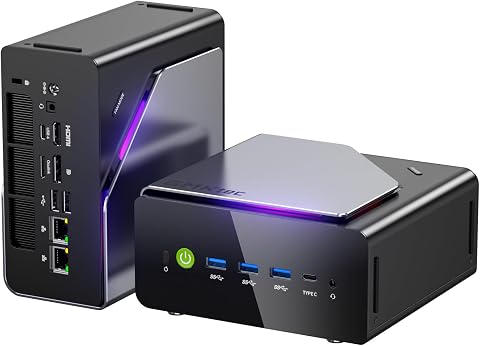 GMKtec K15 Mini PC AI Ultra 5 125U, 12-Core, 32GB DDR5, 1TB PCIe 4.0 SSDView on Amazon →
Why Memory Trumps Processor Labels
The comparison’s core argument is that memory capacity often sets a harder limit on local AI work than processor speed. A model or dataset either fits in available memory or it does not, and the operating system, applications, and processing context all consume that same pool. This is why the EVO-X3’s 128GB earns it a specialist position even though other machines carry newer-sounding processor brands.
For buyers, the practical stakes are money and time. Paying for a top-tier processor that a chosen software stack cannot accelerate, or buying a 512GB machine that fills within months of storing local models, are avoidable mistakes. The roundup also warns that soldered memory cannot be replaced, so compact PCs with non-upgradeable RAM leave little room to adapt as workloads grow.
How the Ten Picks Were Ranked
According to ThorstenMeyerAI, the ranking compared configurations on processor class, installed memory, memory type, storage capacity, and expansion options. Priority went to balanced capability and practical fit for AI-related work, with specialist positions for machines serving a clear need such as unusually high memory (the EVO-X3) or Oculink expansion (the K15).
The methodology explicitly avoids treating product names and specifications as proof of performance. As the source states, “Product names and specifications alone do not establish benchmark performance, cooling behavior, or software compatibility”, so listed specs are treated as configuration facts, not demonstrated advantages. Oculink, meanwhile, is presented as a decision rather than a default benefit: it requires extra hardware, desk space, and setup, and buyers must confirm enclosure, card, connection, and power support before counting on it.
“Product names and specifications alone do not establish benchmark performance, cooling behavior, or software compatibility.”
— ThorstenMeyerAI comparison
What the Spec Sheets Don’t Show
The comparison is built on listed specifications, not benchmark testing. Independent workload results, sustained cooling behavior under AI inference loads, and software compatibility with specific AI tools are not established for any of the ten picks in the source material. A large memory figure does not guarantee a particular model will run well, since memory bandwidth and software support also shape results.
It is also unclear from the listed specs which machines have replaceable versus soldered memory, which SSD form factors each chassis supports, and how the “additional configurations” filling the lower ranks compare in price. Buyers should verify these details directly with vendors before purchasing.
Before Buying: A Verification Checklist
Buyers should next match each candidate machine against their actual workload: calculate memory needs including the operating system and context, estimate storage for all models expected to be kept available at once, and check whether RAM and SSD are user-replaceable. Anyone considering the K15 with Oculink should confirm enclosure, GPU card, connection, and power compatibility before treating external graphics as part of the plan.
For the field itself, the comparison signals that 2026 mini PC releases will likely keep competing on memory capacity and expansion connectivity rather than processor tiers alone. Independent benchmark results for these configurations would settle the performance questions the spec-based ranking leaves open.
Key Questions
Which AI mini PC is the best overall pick for 2026?
According to the comparison, the GEEKOM A9 Max is the best overall pick, pairing a Ryzen AI 9 HX 470 with 32GB of DDR5 and a 2TB SSD in a balanced out-of-box configuration.
Why does the GMKtec EVO-X3 stand out?
Its 128GB of LPDDR5X gives it a distinct role for workloads that need large models or datasets in memory — four times the capacity of most other picks.
Is more RAM always better for local AI?
Not necessarily. The comparison notes that memory capacity often limits what fits, but software support, memory bandwidth, and processing method also determine whether a model runs well.
What is Oculink and should I want it?
Oculink is a connection that supports external graphics enclosures. It suits buyers planning more graphics capacity, but it involves extra hardware, cost, and setup — and the Oculink K15 variant ships with a smaller 512GB SSD.
Are these picks benchmark-tested?
No. The ranking is based on listed specifications and configurations. The source explicitly states that product names and specs do not establish benchmark performance, cooling behavior, or software compatibility.
Source: ThorstenMeyerAI.com
Halloween Picks
halloween
As an affiliate, we earn on qualifying purchases.